
Description
Pilida Keyless Entry Remote Control: Car Key – Features & Prices in Saudi Arabia :
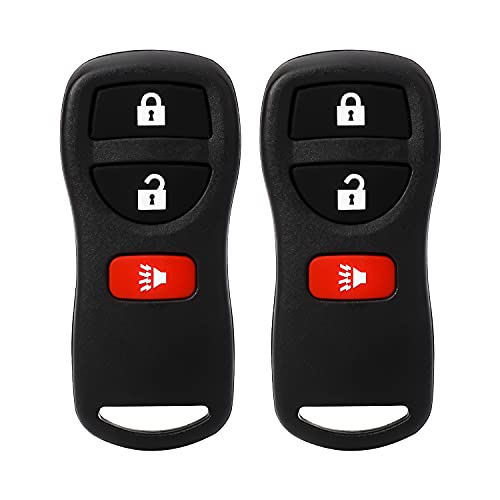
Pilida Keyless Entry Remote Control: Car Key Fob Compatible with Infiniti Nissan Armada Frontier Murano Pathfinder Quest Sentra Titan Versa Xterra| FX35 FX45 QX4 Replacement for KBRASTU15 (2 Pack)
Test video – Pilida Keyless Entry Remote Control: Car Key :
Product highlights :
Questions & Answers – Pilida Keyless Entry Remote Control: Car Key :
Technical specifications – Pilida Keyless Entry Remote Control: Car Key :
Purchase advice :
-
Warranty :
Check the duration of the warranty and also the faults and defects it covers. Is it complete or limited? and What is included in the warranty (parts, repairs or both)?
-
Shipping :
Is delivery offered? And how long does it take to get delivered (Delivery time)
-
Proof of purchase :
Does the shop give you an invoice ?
-
After-sales service :
Do they have an after-sales service to have information about the installation or operation (instructions for use). Also in case of problem, it is the seller who takes charge or you must contact the manufacturer or supplier yourself.
_____________________________
C. T (verified owner) –
These two keyfobs worked great…2009 Nissan Frontier SE – Both of my keyfobs broke from age and useage. The Pilida keyfob worked great. on my 2009 Nissan Frontier SE. Programming was easy and I now have two working keyfobs.
M. K (verified owner) –
‘02 pathfinder 20 seconds to program both remotes – In the drivers seat, make sure all doors are closed – press the lock button on the drivers door – insert the key in & out of the ignition 6 times until the hazard lights flash – reinsert the key and turn the ignition to accessory mode (1 click / no dash status lights on) then press any button on the new fob, the hazard lights will flash acknowledging the fob is now programmed. To program a second fob press the unlock and lock button on the drivers door – press any button on the other new fob – hazard lights will flash again acknowledging the fob is programmed. When finished remove the ignition key – press the drivers door unlock button and exit the vehicle. Congratulations your new key fobs are now programmed to your vehicle.
B. S (verified owner) –
Great for the price just minor problems – They work and connect very easily. For the price they work great the only issues I have is they have a relatively short range so try to remember where you parked and the batter they ship with dies relatively quickly.
B. S (verified owner) –
Great for the price just minor problems – They work and connect very easily. For the price they work great the only issues I have is they have a relatively short range so try to remember where you parked and the batter they ship with dies relatively quickly.
N. H (verified owner) –
Very good value – 1st, the link for installation instructions took me to an ad, not sure what’s up with that. The work around is to research programming a remote for the year, make and model of your vehicle. In just a few minutes I found what I needed and the programming was easy and straightforward. 3 function remote and everything is working correctly.
M. K (verified owner) –
‘02 pathfinder 20 seconds to program both remotes – In the drivers seat, make sure all doors are closed – press the lock button on the drivers door – insert the key in & out of the ignition 6 times until the hazard lights flash – reinsert the key and turn the ignition to accessory mode (1 click / no dash status lights on) then press any button on the new fob, the hazard lights will flash acknowledging the fob is now programmed. To program a second fob press the unlock and lock button on the drivers door – press any button on the other new fob – hazard lights will flash again acknowledging the fob is programmed. When finished remove the ignition key – press the drivers door unlock button and exit the vehicle. Congratulations your new key fobs are now programmed to your vehicle.
N. H (verified owner) –
Very good value – 1st, the link for installation instructions took me to an ad, not sure what’s up with that. The work around is to research programming a remote for the year, make and model of your vehicle. In just a few minutes I found what I needed and the programming was easy and straightforward. 3 function remote and everything is working correctly.
N. Z (verified owner) –
Very good remote control – Sometimes jams a little but overall very good.
F. S (verified owner) –
Perfect – Easy to install and set up. Good Quality
J. D (verified owner) –
Very easy to program – Very good instructions on programming and easy to use. Worked first time I programmed it!
J. D (verified owner) –
Very easy to program – Very good instructions on programming and easy to use. Worked first time I programmed it!
N. Z (verified owner) –
Very good remote control – Sometimes jams a little but overall very good.
C. T (verified owner) –
These two keyfobs worked great…2009 Nissan Frontier SE – Both of my keyfobs broke from age and useage. The Pilida keyfob worked great. on my 2009 Nissan Frontier SE. Programming was easy and I now have two working keyfobs.
F. S (verified owner) –
Perfect – Easy to install and set up. Good Quality
F. C (verified owner) –
Works great – Works great on my 2004 Nissan Xterra. No complaints!
F. C (verified owner) –
Works great – Works great on my 2004 Nissan Xterra. No complaints!